I trained a churn model on Databricks and wired it into Agentforce so your sales reps always know who's about to leave

Hey, let’s be honest. Some customers are doing great, but some others are one bad support call away from leaving. And your sales reps, staring at a Salesforce contact record, usually can’t tell which is which.
So, I wanted to fix that.
Churn: When a customer stops using your service and leaves for good. Customer health: A score that tells you, before it’s too late, how likely that customer is to stay.
What I actually built
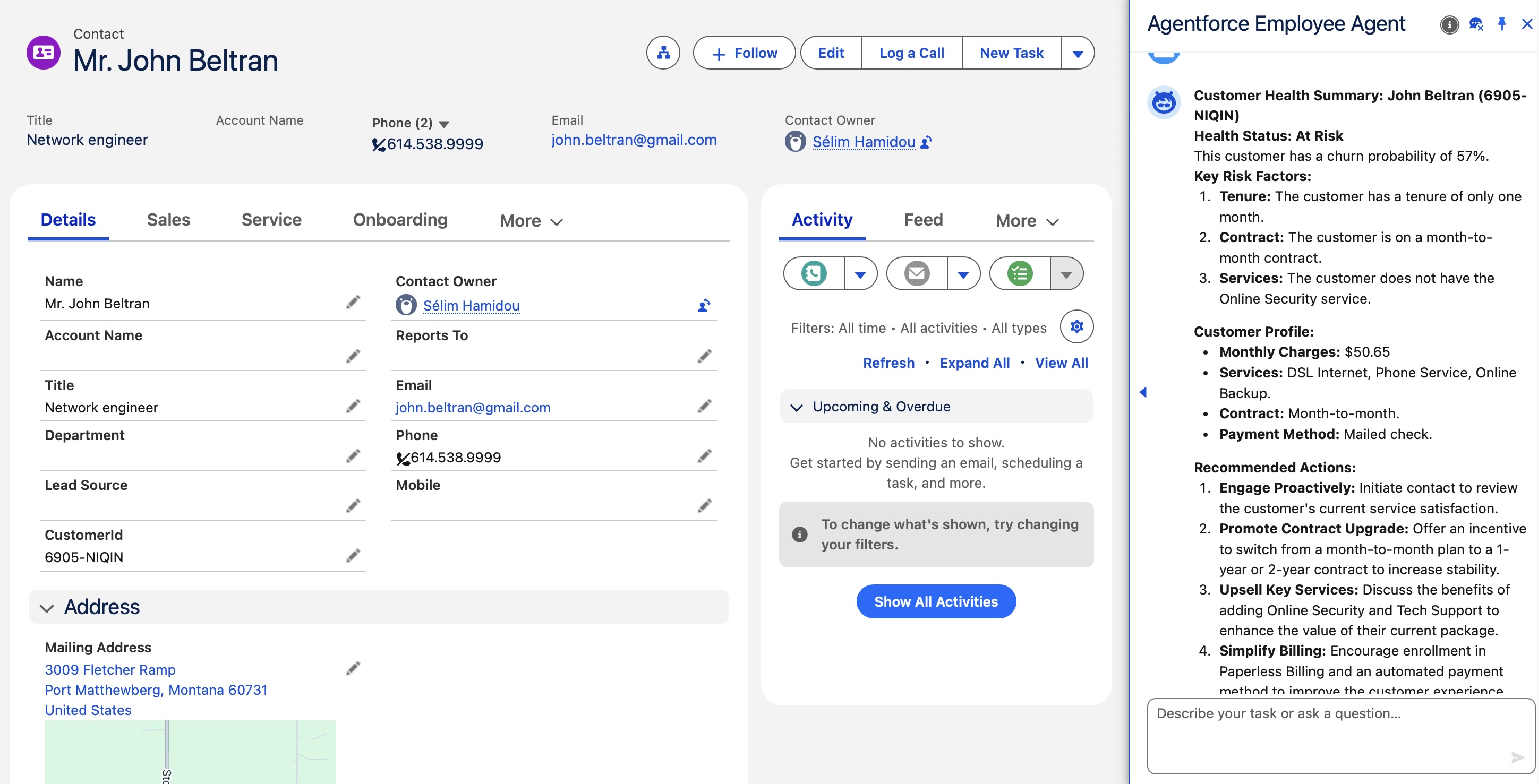
The end result is simple to describe: a sales rep opens a contact, clicks a button, and an AI agent appears in the sidebar. Immediately, without asking anything, the agent gives a verdict:
“This is a healthy customer. Long tenure, good usage patterns, no service incidents. Keep doing what you’re doing, don’t stop believin’.”
Or:
“This customer is at risk. High call volume to support, underusing a plan that doesn’t match their profile, low engagement over the last quarter. Here’s what I’d suggest.”
For each customer, the model returns a resume, which is basically three things: a churn score (it can be any value between 0 and 1: a score of 0 means “all good, stay calm”, and 1 means “panic mode, they’re out the door!!!”), a boolean churn value (“Churn” or “No churn”), and the three main signals behind the assessment. The agent picks those up from a data graph and turns them into something a human can actually act on.
Getting there involves a few moving parts.
The ML pipeline: LightGBM + SHAP + MLflow on Databricks
I used a telecom churn dataset of 7000 lines and 16 features as the base for customer health signals, which was enough for my goal.
On Databricks, I trained a LightGBM classifier inside a sklearn Pipeline, and used MLFlow to deploy it.
The model and the explainability layer
The data from this dataset were pretty straightforward and standardized, so I hadn’t a lot of preprocessing work to do. But, because of the fact that every feature (except MonthlyCharges and Tenure) was categorical, I preferred to choose LightGBM — as long as those columns are typed as category in pandas, LightGBM handles them natively without requiring an explicit encoder. This also matters for the post-training analysis: LightGBM is compatible with SHAP’s TreeExplainer, which we use to compute the local contribution of each feature to the prediction for every individual customer.
pipe = Pipeline([
    ('preprocessing', ct),
    ('model', lgb.LGBMClassifier())
])
pipe.fit(X_train, y_train)

def get_top3_churn_reasons(input_df, pipe):
    import shap
    import numpy as np

    model = pipe.named_steps['model']
    preprocessing = pipe.named_steps['preprocessing']

    input_df = input_df.set_index('customerID')
    X_transformed = preprocessing.transform(input_df)

    explainer = shap.TreeExplainer(model)
    shap_values = explainer(X_transformed)

    predictions_proba = model.predict_proba(X_transformed)
    is_churn = model.predict(X_transformed)

    results = []
    for i, shap_row in enumerate(shap_values.values):
        top3_indices = np.argsort(np.abs(shap_row))[::-1][:3]
        top3_features = [shap_values.feature_names[j] for j in top3_indices]

        results.append({
            'reason_1': top3_features[0],
            'reason_2': top3_features[1],
            'reason_3': top3_features[2],
            'churn_score': float(predictions_proba[i, 1]),
            'is_churn': is_churn[i]
        })

    return results
The MLflow wrapper
Here I’ve used a custom predict function, to be able to send not only the label (“Churn”/”No churn”), but also the scores, and the top 3 reasons.
class CustomerChurnModel(mlflow.pyfunc.PythonModel):

    def load_context(self, context):
        self.model = load(context.artifacts['model_to_log'])

    def predict(self, context, model_input, params=None):
        return get_top3_churn_reasons(model_input, self.model)

with mlflow.start_run():
    model_info = mlflow.pyfunc.log_model(
        name="model_to_log",
        python_model=CustomerChurnModel(),
        artifacts={'model_to_log': 'my_model.pkl'},
        signature=signature,
        code_paths=['utils.py'],
        input_example=X_train.head(10)
    )
The signature is inferred from actual input/output samples, which is what Data 360 uses to validate the schema on its end. Get that wrong and the BYOM connection won’t work. From there, registering and promoting the model to a serving endpoint is handled by MLflow and Databricks. The model becomes an API, and Data 360 can call it.
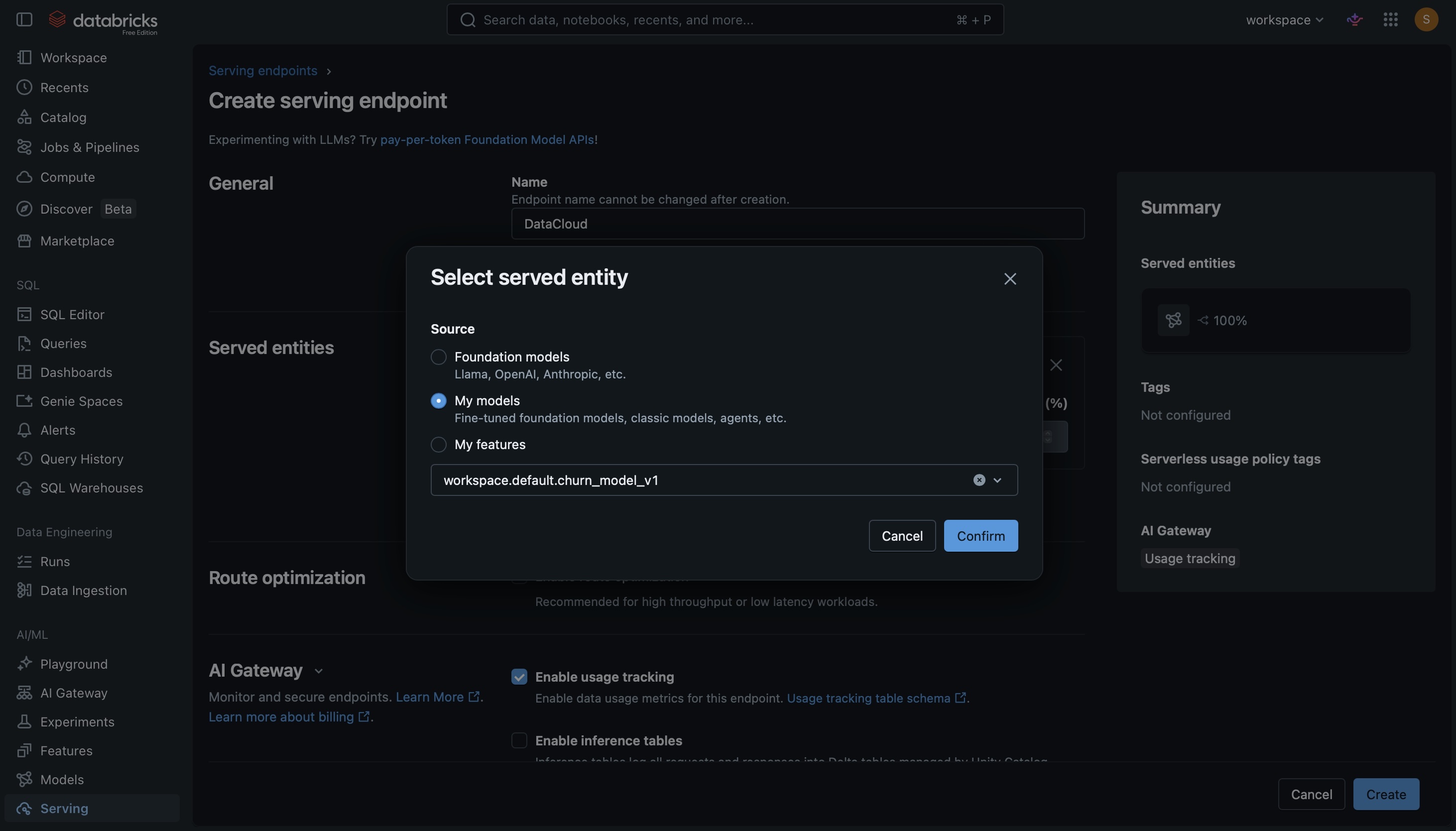
From endpoint to Salesforce: BYOM on Data Cloud
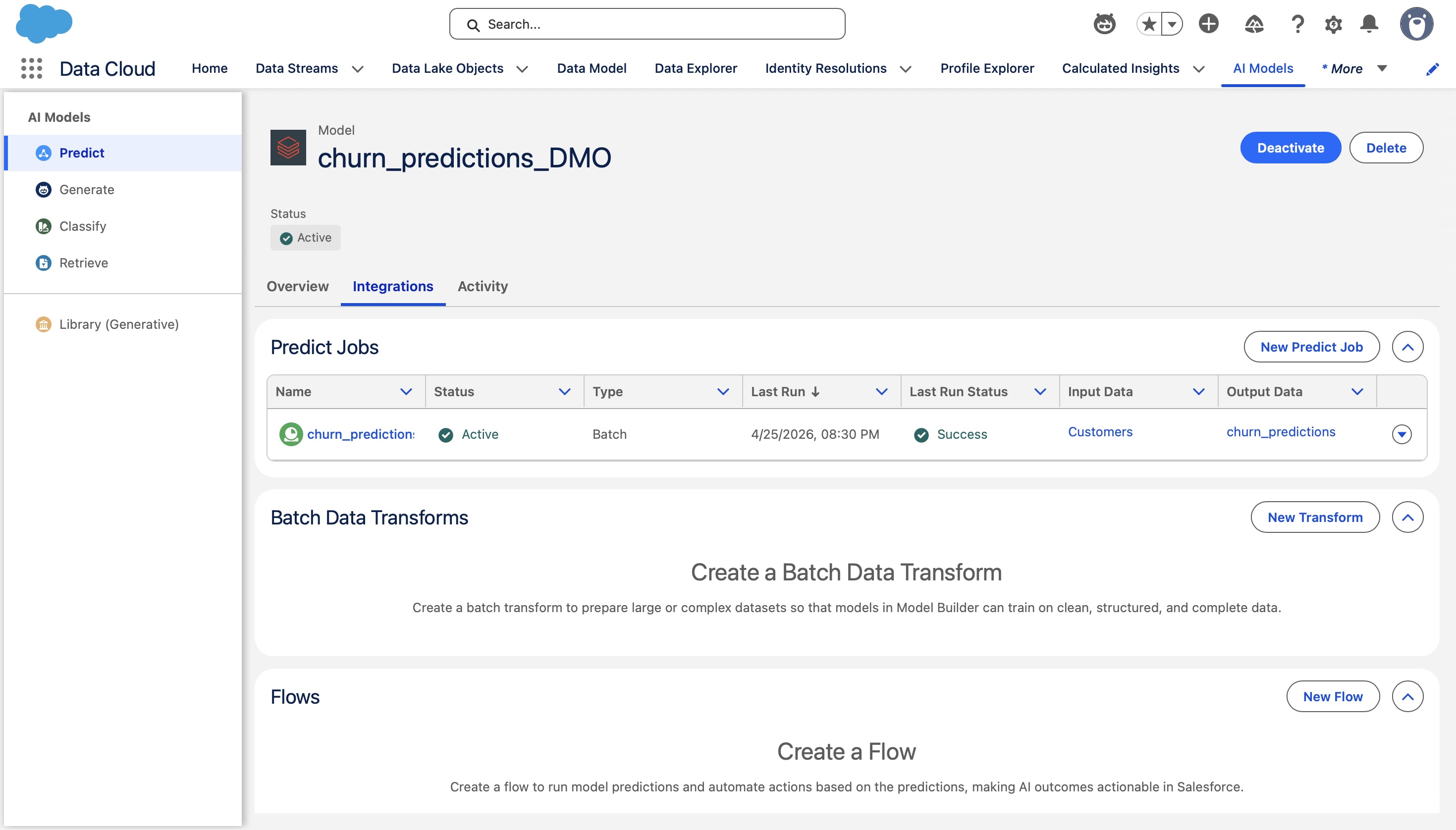
Now that I had my model registered with MLFlow, I had to point it at an external ML endpoint, define the input schema and the output schema, and make Data Cloud to run a batch scoring job that writes the predictions back as a native Data Cloud object.
The data graph: making all the data available in the same spot for Agentforce
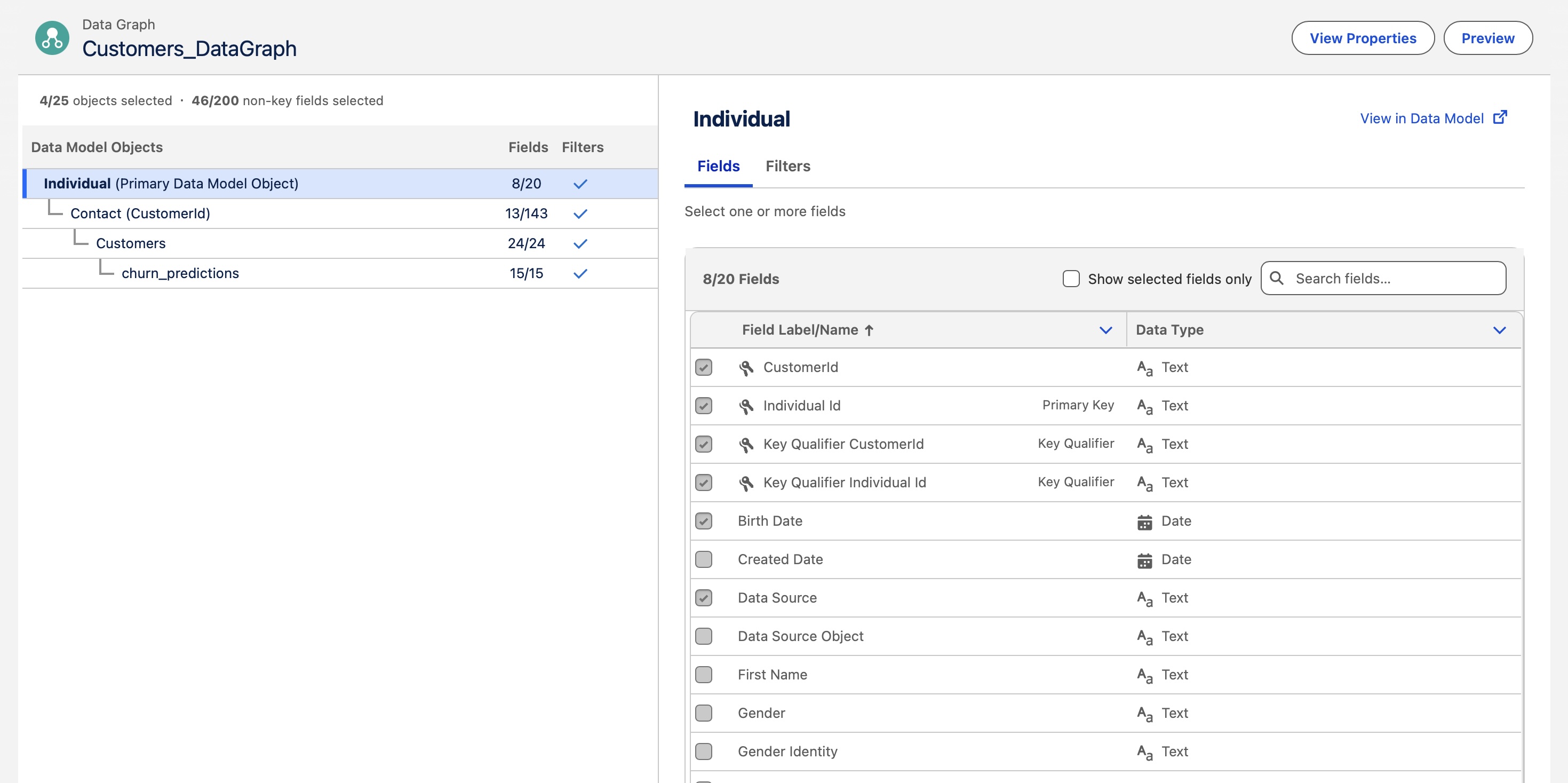
In Data Cloud, I built relationships between four objects:
- Contact (Salesforce core)
- Individual (Data Cloud’s identity layer)
- Customer Dataset (the Kaggle features, ingested into Data Cloud)
- Predictions (BYOM output)
The result is a data graph that, when queried, returns a single JSON with nested sub-nodes: contact info, raw customer signals, and model output, all unified under one identity. And then, the Agentforce prompt template consumes it.
This is the example of a JSON we get from the data graph:
{
	"ssot__Id__c": "0PKgL000003vDQMWA2",
	"CustomerId__c": "1347-KTTTA",
	"ssot__DataSourceId__c": "Salesforce_Home",
	"ssot__PersonName__c": "Justin Johnson",
	"ssot__TitleName__c": "IT sales professional",
	"Contact__dlm": [
		{
			"Id__c": "003gL00000kRPcgQAG",
			"Customers__dlm": [
				{
					"Contract__c": "One year",
					"customerID__c": "1347-KTTTA",
					"PhoneService__c": "Yes",
					"SeniorCitizen__c": 0,
					"StreamingMovies__c": "Yes",
					"StreamingTV__c": "Yes",
					"TechSupport__c": "Yes",
					"tenure__c": 64,
					"TotalCharges__c": 6654.1,
					"churn_predictions__dlm": [
						{
							"churn_score__c": 0.09871883330405543,
							"DataSource__c": "UploadedFiles",
							"DataSourceObject__c": "WA_Fn-UseC_-Telco-Customer-Churn.csv",
							"InternalOrganization__c": "",
							"is_churn__c": "No",
							"PrimaryKey__c": "beb1e4b8c02706fd870ff8efcdab141a52a34bd27e84a156ac9ece5a7d6a97df",
							"PrimaryObjectPk__c": "1347-KTTTA",
							"reason_1_churn__c": "remainder__MonthlyCharges",
							"reason_2_churn__c": "categorical_columns__OnlineSecurity",
							"reason_3_churn__c": "categorical_columns__StreamingTV",
							"shap_value_1_churn__c": 0.6700781802409774,
							"shap_value_2_churn__c": 0.35319713315298523,
							"shap_value_3_churn__c": 0.18546281591530087
						}
					]
				}
			]
		}
	]
}
The Agentforce now
The prompt template receives the data graph JSON and produces the summary the sales rep sees when they click the button. The agent then clicks on a button to open Agentforce. Agentforce calls the prompt template, which prints the resume of the current customer churn assessment.
What makes this interesting as a UX pattern is that the conversation doesn’t stop there. The rep can ask follow-up questions, request a draft retention email, ask about similar customers, or dig into specific signals. The agent has the full context from the data graph and can work with it.
What I’d tighten up in production
A few things that are fine for a proof of concept but would need work at scale:
- Automating batch scoring and model training: trigger the BYOM job on new data ingestion rather than manually
- Model monitoring in MLflow: track prediction distribution over time, alert on drift
- A proper feature pipeline: ensure training features and serving features are computed identically, which matters more than it sounds once you have multiple data sources
Sources & tools
- The dataset I used
- Scikit-learn documentation
- SHAP — SHapley Additive exPlanations
- MLflow documentation
- Salesforce Data Cloud - BYOM
- Agentforce documentation
Cheers, Sélim HAMIDOU